ffmpeg源码编译 #9

Open
opened 2022-07-23 13:38:21 +00:00 by sookie · 1 comment
Owner
  1. 解压源码包
tar -jxvf ffmpeg-5.1.tar.bz2
  1. 生成Makefile文件
./configure --prefix=/usr/local/ffmpeg --enable-gpl --enable-nonfree --enable-libfdk-aac --enable-libx264 --enable-libx265 --enable-filter=delogo --enable-debug --disable-optimizations --enable-libspeex  --enable-shared --enable-pthreads --enable-version3 --enable-hardcoded-tables --cc=gcc --host-cflags= --host-ldflags= --disable-x86asm

其中--prefix可以指定编译后执行make install的安装位置

  1. 可能缺少的库
    会在执行configure时提示
# brew
apt install linuxbrew-wrapper

# yasm
apt install yasm

# aclang
apt install aclang
 
# pkg-config
apt install pkg-config

# clang
apt install clang

# libfdk-aac
apt install libfdk-aac-dev

# speex
apt install libspeex-dev

# x264
apt install libx264-dev

# x265
apt install libx265-dev libnuma-dev
  1. 编译安装
make && make install
  1. 运行时问题
    如果没有安装在默认的目录下,运行时可能出现
    ffmpeg: error while loading shared libraries: libavdevice.so.59: cannot open shared object file: No such file or directory

比如在上述安装配置中,指定了安装位置是**/usr/local/ffmpeg**,那么执行

vim /etc/ld.so.conf

修改库文件查找位置
添加一行

/usr/local/ffmpeg/lib

之后执行

ldconfig

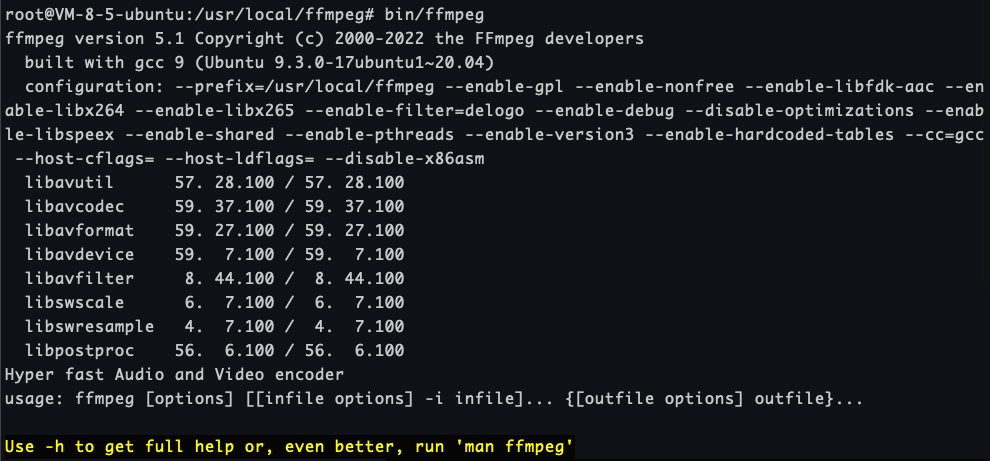
现在可以运行了
image

1. 解压源码包 ``` tar -jxvf ffmpeg-5.1.tar.bz2 ``` 2. 生成Makefile文件 ``` ./configure --prefix=/usr/local/ffmpeg --enable-gpl --enable-nonfree --enable-libfdk-aac --enable-libx264 --enable-libx265 --enable-filter=delogo --enable-debug --disable-optimizations --enable-libspeex --enable-shared --enable-pthreads --enable-version3 --enable-hardcoded-tables --cc=gcc --host-cflags= --host-ldflags= --disable-x86asm ``` 其中--prefix可以指定编译后执行**make install**的安装位置 3. 可能缺少的库 会在执行**configure**时提示 ```bash # brew apt install linuxbrew-wrapper # yasm apt install yasm # aclang apt install aclang # pkg-config apt install pkg-config # clang apt install clang # libfdk-aac apt install libfdk-aac-dev # speex apt install libspeex-dev # x264 apt install libx264-dev # x265 apt install libx265-dev libnuma-dev ``` 3. 编译安装 ``` make && make install ``` 5. 运行时问题 如果没有安装在默认的目录下,运行时可能出现 **ffmpeg: error while loading shared libraries: libavdevice.so.59: cannot open shared object file: No such file or directory** 比如在上述安装配置中,指定了安装位置是**/usr/local/ffmpeg**,那么执行 ``` vim /etc/ld.so.conf ``` 修改库文件查找位置 添加一行 ``` /usr/local/ffmpeg/lib ``` 之后执行 ``` ldconfig ``` 现在可以运行了 ![image](/attachments/e0ff76f1-13cb-4592-915b-9b1a1c0303aa)
sookie added the
备份
label 2022-07-23 13:38:21 +00:00
Author
Owner

mov转mp4

ffmpeg -i {in-video}.mov -vcodec h264 -acodec aac {out-video}.mp4
### mov转mp4 ``` ffmpeg -i {in-video}.mov -vcodec h264 -acodec aac {out-video}.mp4 ```
Sign in to join this conversation.
No Milestone
No project
1 Participants
Notifications
Due Date
No due date set.
Dependencies

No dependencies set.

Reference: sookie/blog-web#9
No description provided.